PBR Doctor
A downloadable tool for Windows
PBR Doctor is a standalone tool for diagnosing and repairing PBR maps produced by AI generators (Meshy, Tripo, Luma, Stable Diffusion, Photoshop generators, etc.).
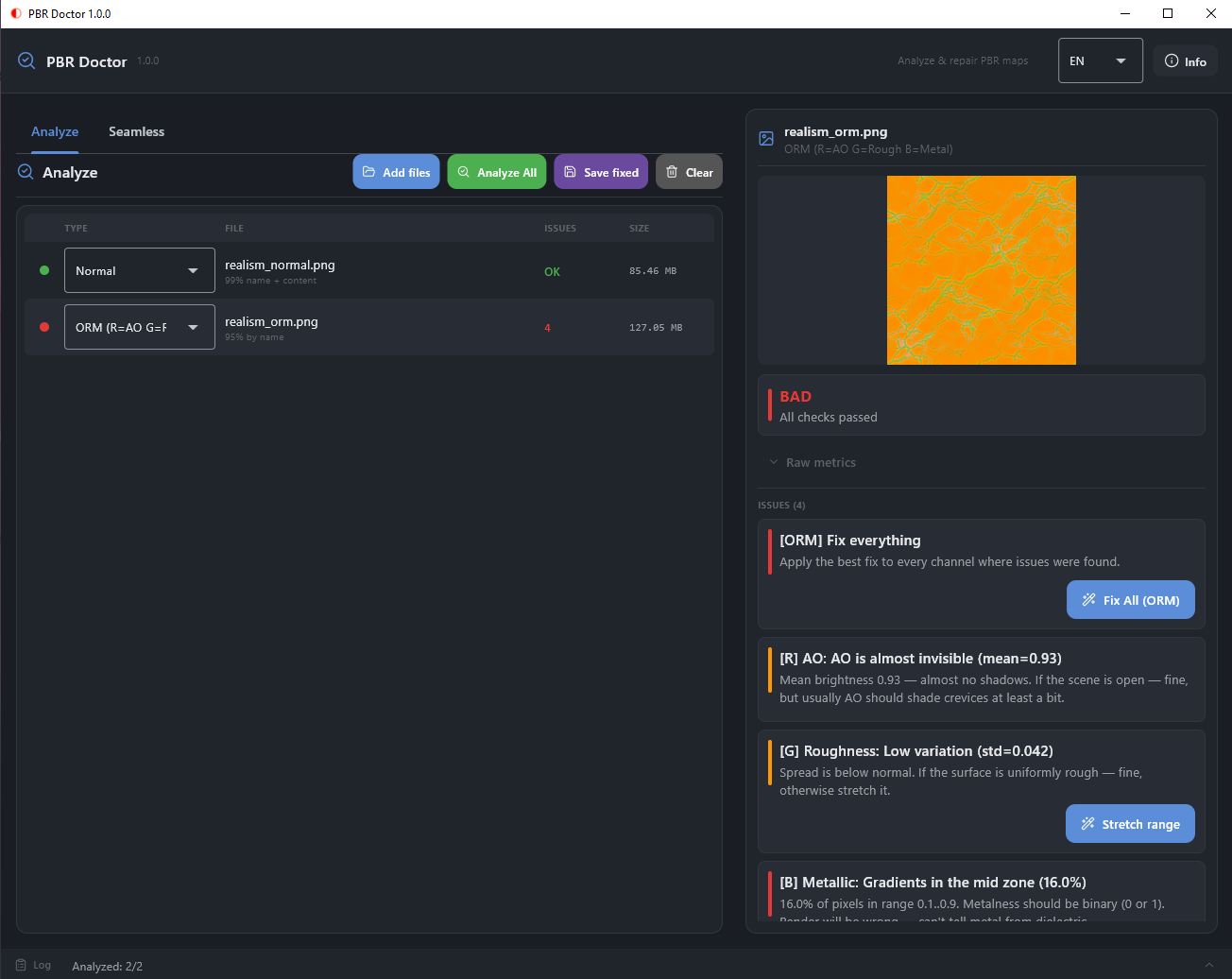
Load maps → get a report on what's wrong → fix in one click → save as 8-bit or 16-bit. A dedicated Seamless tab brings maps to tileable form.
What's new in 1.1.1-beta
- DirectML GPU backend — soapiness removal (SCUNet-GAN) now runs on any DirectX 12 GPU: NVIDIA, AMD, Intel. No CUDA, no cuDNN, no TensorRT installation required. CPU fallback if DirectML is unavailable.
- ~2× faster soapiness fix — the second model pass was removed; quality is unaffected, inference time is halved
- Full-screen preview — click any map thumbnail to inspect it at full resolution, with a Before / After toggle
- Real progress bar — determinate percentage and live tile counter instead of an indeterminate spinner
- Fixed UI freeze on 8K maps — analysis and fixes now run on a background thread; the interface stays responsive
- Smarter map detection — Albedo and ORM are now classified by filename priority, so AI-generated albedo maps are no longer misdetected as Metallic or Edge
- Cleaner output — diagnostic logging removed from the console
- 3 languages — English, Russian, Chinese (Simplified)
Features
- Load maps — drop files, type is auto-detected (by name and by content)
- Analysis — traffic-light verdict OK / Warning / Fail, raw metrics, plain-language explanation
- One-click fixes — stretch range, make grayscale, restore B channel, binarize, invert AO, remove baked light, auto-correct albedo, remove soapiness
- Undo + Reset all fixes — roll back any fix or all fixes on a map
- ORM — per-channel analysis with "Fix All"
- Seamless — three algorithms with before/after preview
- 16-bit — full load and save support
- Three languages — English, Russian, Chinese (Simplified), with system auto-detection
Supported map types
- Normal — baked light, vector lengths, degenerate B channel
- Roughness — dead map, narrow range, noise, color channels
- Metallic — mid-zone gradients, all-zero / all-one
- Ambient Occlusion — dead, too dark / too light, narrow range
- ORM — per-channel analysis (AO + Roughness + Metallic)
- Albedo / BaseColor — soapiness, exposure, contrast, saturation, color cast
- Height / Displacement — basic grayscale and range checks
- Edge / Outline — binarity, noise
GPU acceleration
Soapiness removal runs SCUNet-GAN through DirectML, a universal GPU backend that works on any DirectX 12 graphics adapter. No proprietary SDKs required. If DirectML is unavailable, inference falls back to CPU automatically.
Install
- Download PBR Doctor Setup v1.1.1-beta.exe below
- Run the installer (choose English / Russian / Chinese)
- Launch from Start Menu or Desktop
No Python, no dependencies needed — everything is bundled.
Windows 10 / 11 (64-bit).
Requirements
- Windows 10 version 1903 or newer (DirectX 12 for GPU acceleration)
- ~400 MB free disk space after install
- No GPU? Works on CPU too — just slower for 8K textures
License
MIT
Author
INV.LVL
Download
Click download now to get access to the following files:
Leave a comment
Log in with itch.io to leave a comment.